Search Microsoft 365, Gmail and IMAP email
Inbox and Sent items, attachments included. A mailbox stays private to the person who connected it; being an administrator does not let anyone search a colleague’s email.
Cortex, the private AI appliance
One box in your building that reads your documents, email and business software, answers your team’s questions with the source shown, and works as an everyday AI assistant. Nothing it reads or writes leaves your network.
Answers with sourcesOpen the document behind any claim
Permission-awarePeople see only what they are allowed to see
Works offlineThe model runs in the building, not online
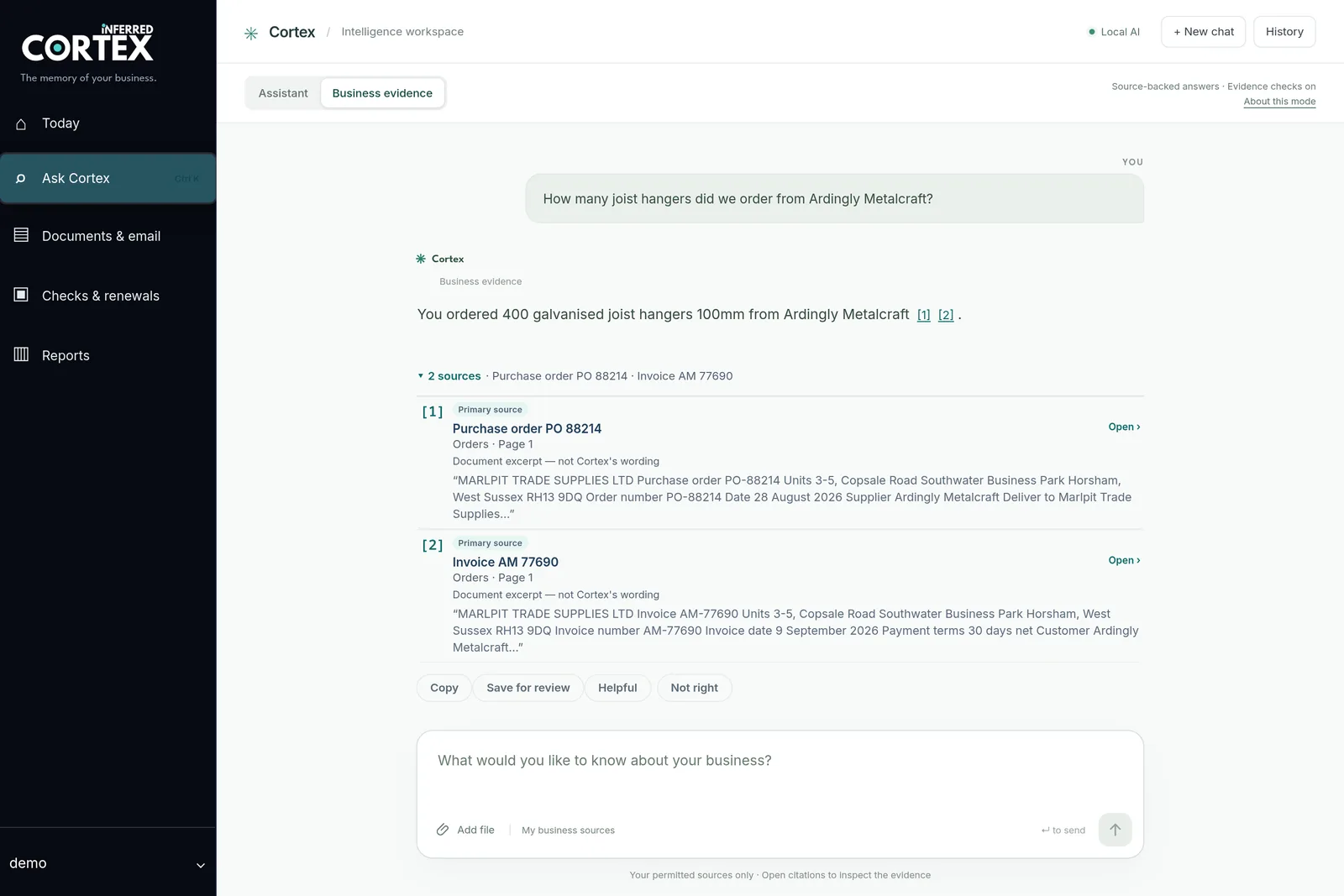
Business evidence mode
Cortex answers from the files, email and records each person is allowed to see, and lists the documents it used beneath the answer, with the exact passage quoted.
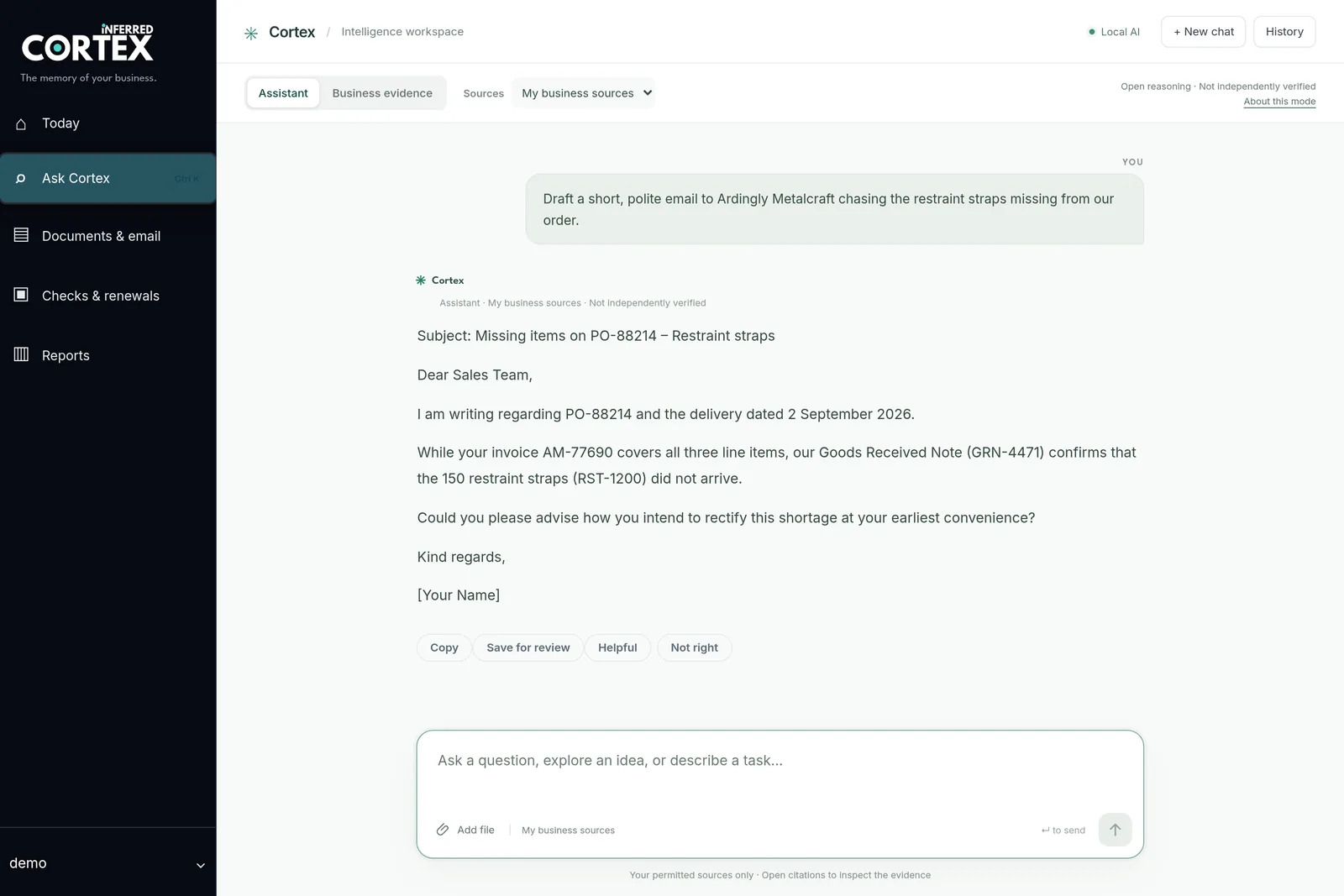
Assistant mode
Draft an email, explain a contract clause, turn notes into a plan. Assistant mode gives your team the everyday help people now expect from AI, running on your own hardware, so nobody needs to paste company work into a public chatbot.
Microsoft 365, Google Workspace, Xero, Sage and more
Cortex connects, read-only, to the email, files, calendars and business software a small firm already pays for. It copies what it is allowed to read onto the appliance, keeps that copy up to date, and changes nothing at the source.
Inbox and Sent items, attachments included. A mailbox stays private to the person who connected it; being an administrator does not let anyone search a colleague’s email.
Choose a site, library or folder, alongside your network shared drives. Each person’s connection sees what their own account can open, and no more.
Meetings, visits and deadlines from ninety days back to a year ahead, so questions about the week come with dates attached. Event notes are left out.
Customers, suppliers, invoices, bills and payments, refreshed on a schedule. Balances come from the records themselves, grouped by currency.
Contacts, companies and deals with their stages, so a question about a customer can take in the pipeline as well as the paperwork.
Orders, products, refunds and payouts. An administrator sets these up, and colleagues are given access through the same permissions as everything else.
We set the connections up during installation. Each one uses the read access that service grants, which can be withdrawn from the service itself at any time. Desktop Sage 50 is not supported yet; if your business runs on it, we can build the link.
Beyond search
Most working days are not one question. Cortex adds a few plain screens around the answers, for the things a small office otherwise keeps on a whiteboard.
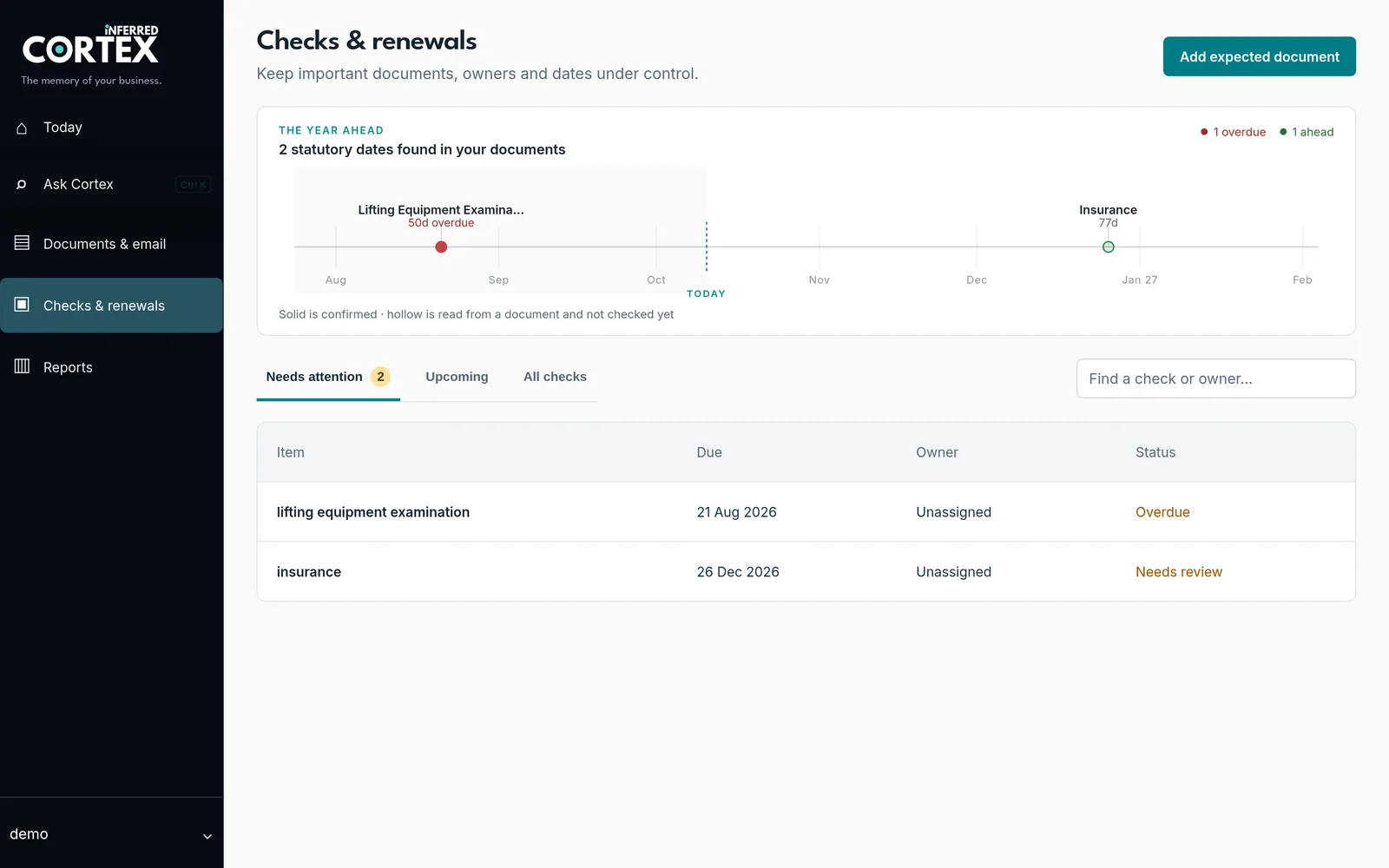
Checks & renewals gathers expiry dates found in your documents for someone to confirm, and records the documents you expect to hold. Reminders appear when they fall due.
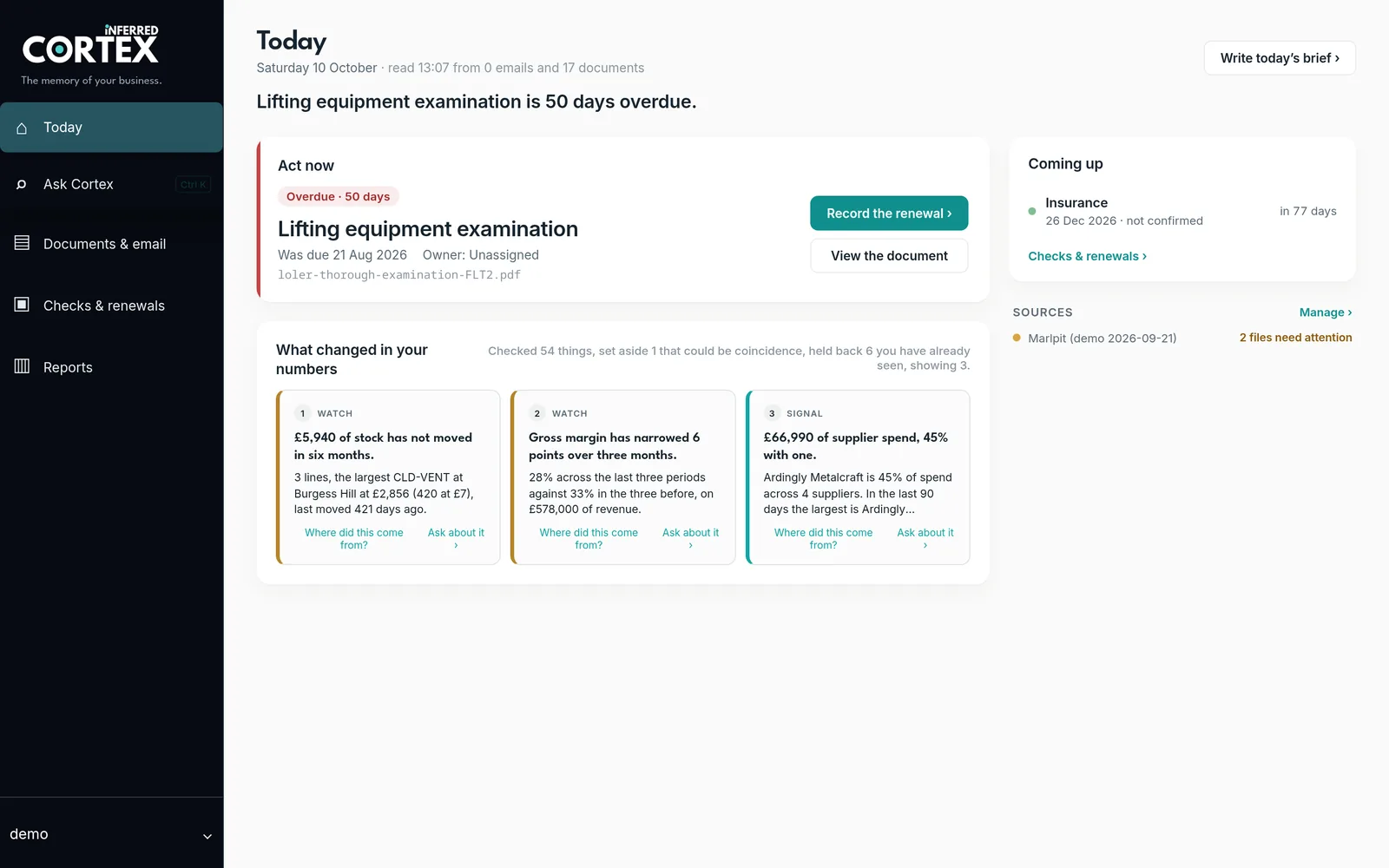
The Today page shows what needs acting on, what is coming up and what is waiting on someone else, from the sources each person is allowed to see.
Save answers and drafts as prepared work, assign a reviewer, then approve and export a PDF. Approved wording is kept as a fixed version. Cortex does not send anything itself.
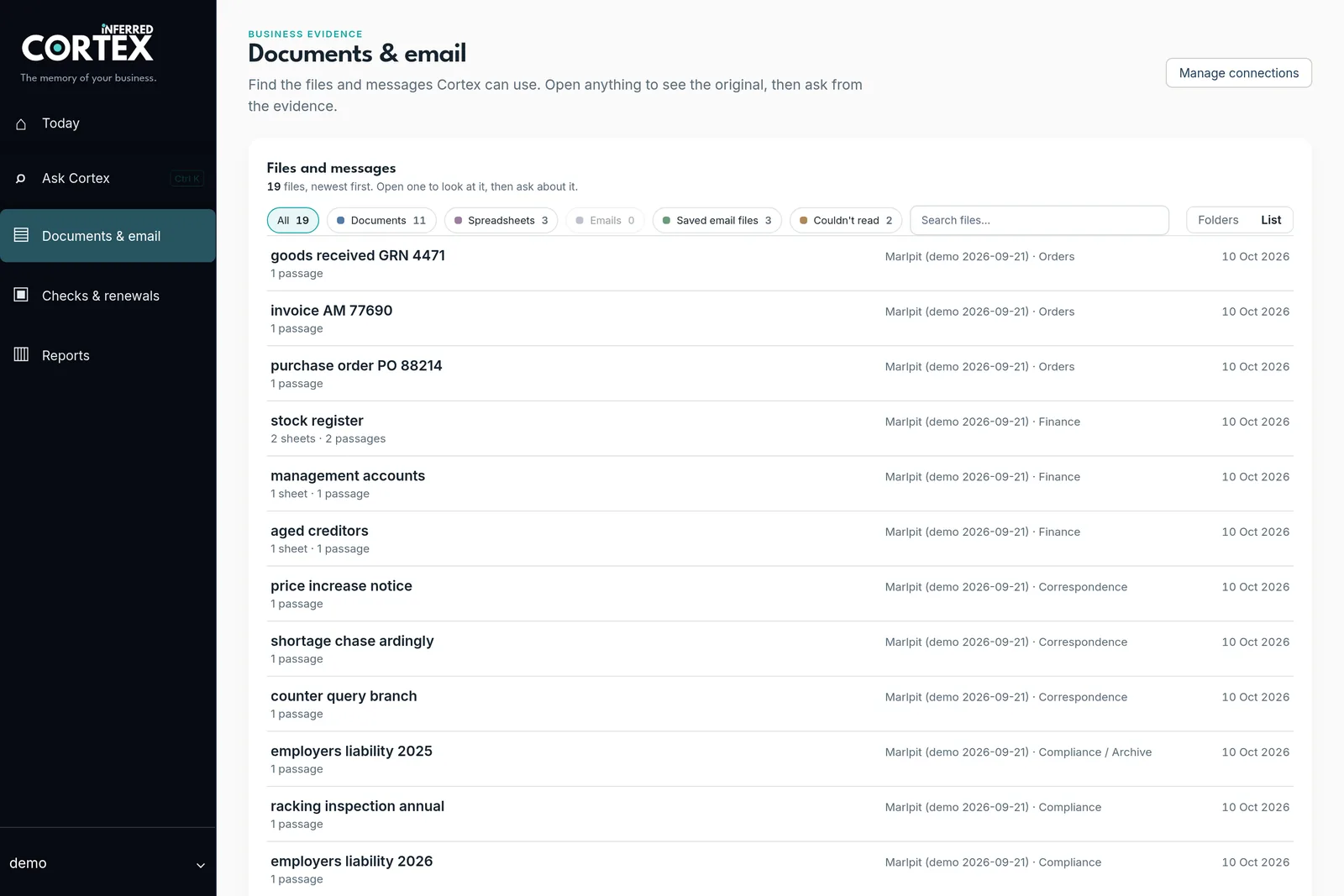
Documents & email
Every file and message Cortex can use is listed, with where it came from. Open the original, ask about it directly, or spot the scan it could not read before anyone relies on it.
Control
Private does not mean automatically perfect or secure. What changes is that the boundary is in your building, where you can see it and test it.
Collections are shared deliberately. A person searches only what they have been given, and an administrator role does not bypass it.
Connections ask for read access. Cortex does not send email, edit files, post transactions or take any action in another system.
The model, the index and the answers are all on the appliance. Unplugging the line is part of the demonstration.
The AI models are openly published and installed on the appliance, so nobody can raise the price or switch them off remotely.
Backups are encrypted with a password you hold. The System screen shows when the last one actually ran, rather than a reassuring badge.
Sources make checking practical; they do not make the model accountable. A named person still signs off anything that matters.
One price to own it
From £4,950
Installed, and yours outright. The first three months of Care are included. After that, optional Care is £195 a month, cancel any time. If you never pay us again, it keeps working.
What is in the box
Cortex is a GPU machine with the software that reads your approved sources, searches them and answers. We install it on your network, connect your systems and train the team.
See full pricing, or compare owning with renting cloud AI over three years.
Cortex or a bespoke system?
Cortex answers questions about the information you already have. When the problem is the process itself, typing the same order twice or chasing the same paperwork every week, the right answer is usually software built around how you work. Many customers have both.
Years of documents, email and records, and people losing time finding them or asking the one person who knows.
Quotes, jobs, stock, collections or compliance that need a proper record. See what we build.
The Operations Audit shows where the hours go, including when the honest answer is to buy nothing.
Questions people ask
A private AI appliance from Inferred: one machine installed on your network that reads your documents, email and business software and answers questions in plain English, showing the source. It also works as a general AI assistant for drafting and explaining.
In Assistant mode, yes for everyday drafting, explaining and planning, but it runs on your own hardware and does not browse the web. Its local model is smaller than the largest cloud models, so important answers should be checked. Business evidence mode is different: it answers from your records and shows its sources.
Yes. It connects read-only to Microsoft 365 email, calendars, SharePoint and OneDrive; Gmail, Google Calendar and Google Drive; Dropbox; Xero, QuickBooks Online and Sage Accounting; HubSpot and Pipedrive; and Shopify, WooCommerce and Stripe. Desktop Sage 50 is not supported yet.
No. A connected mailbox is private to the person who connected it, and being an administrator does not change that. Shared business sources are opened up deliberately, through permissions.
It is built to answer from your documents and to say when the answer is not there. No AI manages that every time, which is why every answer lists its sources and anyone can mark an answer as wrong for review.
Yes. Everything needed to search and answer is on the appliance. Connected services catch up when the line returns.
One appliance serves the whole team, with no per-seat fee or usage meter.
From £4,950 installed, bought outright, with the first three months of Care included. Optional Care is £195 a month after that. See full pricing.
A useful demonstration
We will show the source, disconnect the internet and ask another. That is more useful than a slide deck.